Prepare with context
Market-regime analysis and structured scanning identify and rank potential opportunities before they reach execution logic.
↗THE SB-ITM ECOSYSTEM
SB-ITM is not a single script deciding when to buy. It is a coordinated environment covering preparation, strategy execution, position protection, reporting and operational supervision.
Discover the engines ↗FROM SIGNAL TO OVERSIGHT
A consistent operational workflow depends on separation of concerns. SB-ITM assigns specific jobs to specialized components rather than asking one algorithm to handle everything.
Market-regime analysis and structured scanning identify and rank potential opportunities before they reach execution logic.
↗Candidate selection, strategy configuration, capital availability and entry constraints determine which opportunities can proceed.
↗Eligible trades are placed via Interactive Brokers using the configured Swing or Intraday strategy and account controls.
↗Position monitoring, protective orders, cash checks, reporting and Watchdog supervision support ongoing operations.
↗TRADE TRACEABILITY / LIVE INTERFACE EXAMPLE
The trade register is presented in a readable table, separating open positions from completed trades and identifying the current session.
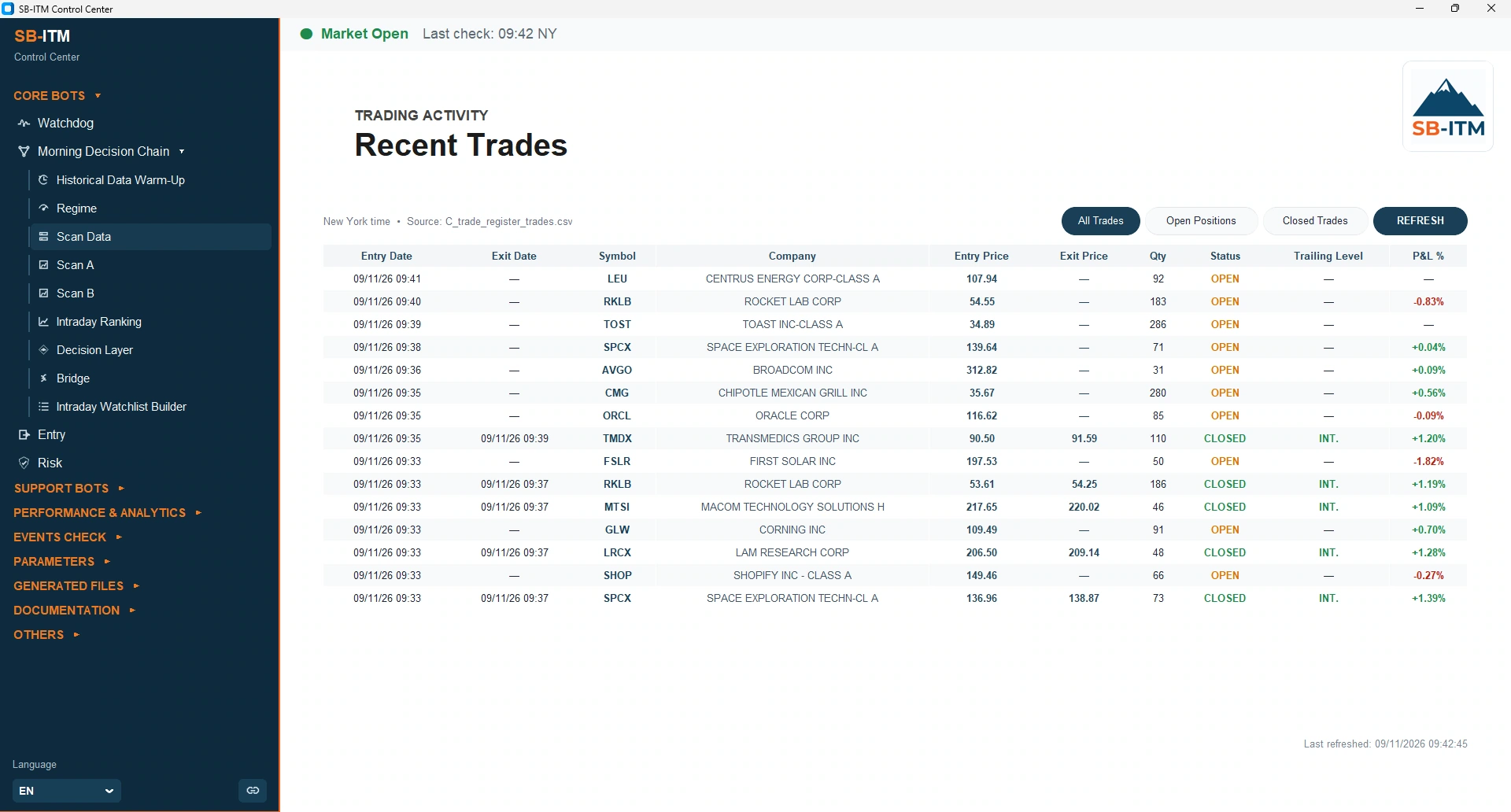
Date, symbol, order status, exit profile and percentage result are visible through the Control Center. The example was captured during a US market session.
Explore monitoring and protection ↗NEW TO AUTOMATED TRADING?
You do not need to configure servers or program bots yourself. You do need to understand the risks of trading and keep control of your own brokerage account.
Understand what Swing and Intraday do, and what automation cannot guarantee.
Open and verify your own broker account and required market data access.
The dedicated managed Windows environment hosts the SB-ITM components.
Explore the simulated environment before deciding whether LIVE trading suits you.
Review settings, positions and reports; retain responsibility for trading choices.
The brokerage account where orders are submitted; it remains in your control.
A dedicated remote Windows server that runs the ecosystem independently of your personal computer.
Simulated trades for learning and testing. They do not predict LIVE outcomes.
ENGINEERING BEHIND THE EXPERIENCE
A dedicated Windows environment with scheduled operations, deployment procedures and technical support.
Health checks and restart logic for critical components, with safeguards for exceptional states.
Protective order rules, stop-loss, take-profit and trailing mechanisms operate within a configurable framework.
One place to inspect trading activity, parameters, reports and operational views. Available in 12 interface languages.
Cash checks, position monitoring, trade records and portfolio snapshots support transparency.
Performance reviews and operational reports turn recorded activity into structured information.
AUTOMATION WITH RESPONSIBILITY
Automated safeguards may fail or be delayed during market gaps, disconnections or broker interruptions. Risk remains with the account holder.
NEXT: THE STRATEGIES
Explore how the Swing and Intraday engines differ in trading horizon, entry logic and capital usage.